
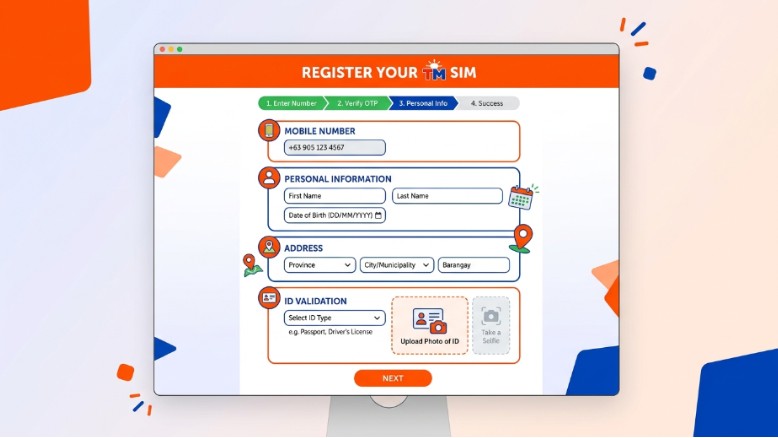

If you are looking for tm sim registration, this guide will show you the easy way to do it. TM users in the Philippines can register through Globe’s official SIM registration page or the GlobeOne app. The process is simple, free, and made to help you keep your SIM active and safe.
A lot of people delay SIM registration because they think it will take too long. It does not have to be hard. If you have your ID ready and you use the official page, you can finish the process in just a few steps. Globe says TM is included in the official SIM registration flow, and the registration is free and zero-rated.
What the SIM Registration Act Means
The SIM Registration Act is a law in the Philippines that requires SIM owners to register their SIM cards. Globe says this applies to physical SIMs and eSIMs, and it is meant to help stop scams, smishing, and fraud. If a SIM is not registered, it may not be activated or used for calls, texts, and mobile internet.
This law also covers more than one kind of user. Globe says it applies to locals, foreigners, and corporate users who bought SIMs in the Philippines. That means TM users need to follow the same rule and use the official registration path.
The goal is simple. The law is there to help keep mobile users safer. It makes it harder for bad actors to hide behind unregistered SIMs. That is why registering your TM SIM is not just a rule. It is also a smart way to protect your number.
Why TM SIM Registration Matters
TM SIM registration matters because it helps keep your line active. Globe says all SIMs sold by telcos or authorized resellers must be registered through official platforms before use. If you skip the process, your SIM can be deactivated and you may lose service.
It also helps protect your personal information. Globe warns that fake SIM registration links are spread online by fraudsters. These fake pages try to trick people into sharing sensitive details. That is why you should only register through the official Globe SIM registration site or the GlobeOne app.
Another reason is peace of mind. When your SIM is registered the right way, you know your account is following the law. You also know you used the real channel, not a risky copycat page. That makes the whole process safer and easier.
TM Easy Plan 150 and surf4all99 After Registration
After you finish your SIM registration, you can start looking at TM promos and load offers that fit your needs. In Globe’s 2026 prospectus, TM EasyPlan150 and surf4all99 are listed among the TM offers available to customers. The document also notes that TM customers can subscribe to surf4all99, which is a shareable promo for up to four friends or devices.
Globe also shows that some TM promos can be managed through GlobeOne and GCash, and that GoRENEW can be used for selected promos like SURF4ALL99. This is helpful if you want to keep a promo going without starting over each time.
It is still best to finish your SIM registration first. Once your TM SIM is registered, you can move on to promos and plan choices with less trouble. That keeps your account ready for calls, texts, and data use.
What You Need Before You Start
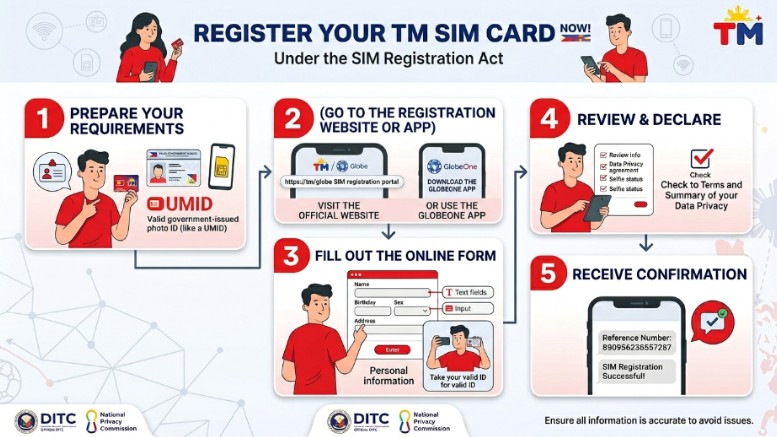
Before you register, prepare your basic details. Globe says you need your full name, date of birth, gender, address, and a valid government-issued photo ID. The ID must not be expired.
Globe also lists accepted IDs such as passport, driver’s license, National ID, BIR ID, UMID, Postal ID, SSS ID, and PRC ID. For smoother registration, Globe recommends using a PVC-type ID because paper IDs or IDs with printed photos may not be accepted as easily.
If you are registering for a company or government entity, Globe says you may need the authorized representative’s details, the company or government entity name and address, a valid ID, and extra papers like a certificate of registration or board resolution.
How to Register Your TM SIM Step by Step
The official way to register TM SIM is through Globe’s online SIM registration page or the GlobeOne app. Globe says TM users can register in a few easy steps using either of those official channels.
First, open the official registration page or the GlobeOne app. Globe’s guide says the process starts with tapping “Register Now” in the app or entering your mobile number in the official portal. Then you verify your number and move to the next step.
Next, fill in your personal details exactly as they appear on your ID. Globe says this includes your full name, date of birth, gender, and address. Make sure every detail is correct, because wrong information can slow things down.
After that, upload your valid ID and follow the photo or selfie step if the page asks for it. Globe says its system uses stronger security tools like encryption, live photo capture, and OCR for document checks. That helps make the process more secure and more accurate.
Once you review your details, submit the form. Globe says the online SIM registration is free and zero-rated, so you should not be charged for the process. When you finish, keep your reference number or confirmation message for later use.
How to Check If Your TM SIM Is Registered
After you submit the form, you can check if the process worked. Globe says prepaid users may receive an SMS confirmation after successful registration. You can also look for a registered badge in the GlobeOne app.
If you do not get the confirmation SMS right away, Globe says you can go back to the official online registration portal and enter your number to check the status. This is a simple way to confirm that your SIM was registered correctly.
For postpaid customers, Globe says the data is already in its system, but the company may still contact them to confirm and complete registration details. That means the process can be a little different depending on your SIM type.
How to Stay Safe From Fake Links
Globe has warned customers about fake SIM registration links that look real but lead to harmful pages. These fake sites are made to steal personal information. Because of that, Globe says users should only use the official SIM registration site or the GlobeOne app.
A safe registration page should not ask you to do strange things. It should not ask for payment just to register your SIM. Globe says SIM registration is free, so be careful if anyone tries to charge you for help.
It is also smart to check the link before you click. If the page looks odd, has too many ads, or asks for extra information that does not seem needed, stop and leave the site. Globe says customers who need help can go to the nearest Globe Store instead of trusting third-party pages.
What Happens If You Do Not Register
If you do not register your SIM, Globe says it will not be activated, and you will not be able to use it for mobile internet, calls, and texts. Globe also says that failure to comply can lead to automatic deactivation of the SIM card.
That is why it is better to register early. Once a SIM is deactivated, it can cause trouble for your number and your daily communication. Globe’s terms also say that non-compliance can affect service, so it is best to finish registration as soon as possible.
What to Do If Your TM SIM Still Does Not Work
Sometimes a SIM may still have issues after registration. Globe says if your SIM is registered but still is not working, you can contact Globe Telecom through Facebook Messenger or visit the nearest Globe Store.
If you use Business Prepaid services, Globe also lists email and hotline support for that group. But for normal TM users, the main help options are the official support channels and nearby store assistance.
If your SIM says it has already been registered, Globe says you should contact support or visit a Globe Store. That is the best way to check whether something went wrong with the record or the activation step.
Special Notes for Minors and Families
If the SIM owner is below legal age and does not have a government ID, Globe says the SIM must be registered under the name of the parent or legal guardian. This keeps the registration in line with the SIM Registration Act.
That means families should prepare the right information before they begin. A parent or guardian should keep the details ready, then complete the process through the official channel. This makes the process smoother and avoids delays.
Good Habits After Registration
After you register, save your reference number in a safe place. Globe says this can help with future concerns. It is a small step, but it can save time later.
It also helps to keep using official channels for other TM tasks, like loading promos and checking account details. GlobeOne supports TM services, including SIM card registration and add-on use, so it is a useful app to keep on your phone.
You should also watch for scam texts and suspicious links. Globe’s scam advisory says some messages may look like official “TM” or “GLOBE” threads, but the content can still be fake. That is why staying alert matters even after your SIM is registered.
Simple Mistakes to Avoid
Do not use a fake registration page. Do not enter wrong details. Do not skip the last step. Do not pay someone to do the process if you can do it yourself for free. Globe says registration should be done through the official portal, the GlobeOne app, or Globe stores only.
Also, do not ignore the ID rules. Use a valid, unexpired ID and make sure your information matches the ID exactly. That helps avoid delays and keeps the process smooth.
Why This Process Is Worth It
The TM SIM registration process is worth doing because it keeps your SIM active and helps protect you from fraud. Globe says the law was made to protect consumers from scams and other illegal activity that can happen through unregistered numbers.
It also makes future account use easier. Once your TM SIM is registered, you can move on to promos, data offers, and other services with more confidence. TM offers like EasyPlan150 and surf4all99 are part of the wider TM lineup, and registered users can handle those services through the official Globe systems.
Final Thoughts
If you want to register your TM SIM the right way, keep it simple. Use the official Globe registration page or the GlobeOne app. Prepare your ID. Enter your details carefully. Then save your confirmation after you finish. Globe says the process is free, quick, and made for TM users under the SIM Registration Act.

John Bobo is an experienced professional with over 10 years of expertise in his field. He is passionate about sharing knowledge, inspiring others, and helping people achieve their goals. With a strong background built through years of dedication and hard work, John continues to create valuable content that informs and motivates his readers.