
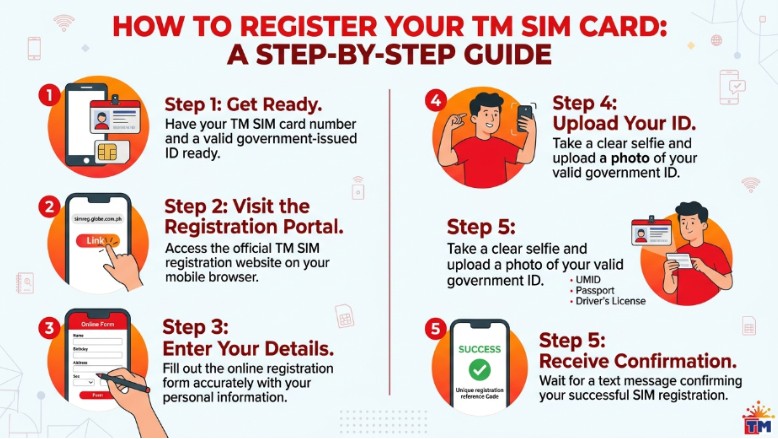

Many users search for tm sim registration when they want to keep their TM number active and ready to use. The process is simple if you follow the right steps. TM users in the Philippines can register through Globe’s official SIM registration page or the GlobeOne app, and the process is made to be quick and safe.
If you are new to SIM registration, do not worry. You only need a few details, a valid ID, and a phone with internet access. The most important thing is to use the official channels and avoid fake links online. Globe has warned customers that fake SIM registration sites exist, so it is best to register only through the official portal or app.
Why TM SIM Registration Matters
SIM registration is not just a formality. It helps keep your mobile number active and supports safer mobile use. Globe says SIM registration is required for all SIM owners in the Philippines, including TM users, and unregistered SIMs may not be activated or may lose service.
It also helps protect people from spam, scams, and fraud. Globe has said that users should register through official platforms only, because fake sites are made to steal personal details. That is why it is smart to take a few extra minutes and do it the safe way.
What You Need Before You Start
Before you begin, prepare your basic information. Globe’s SIM Registration Act FAQ says you need your full name, date of birth, gender, address, and a valid government-issued photo ID. For company or group registration, extra documents may be needed.
You should also keep your phone number ready and make sure your device has internet access. If you are using a new SIM, registration is done before full activation. Globe’s official SIM registration page shows the process in five easy steps, starting with number verification.
How to Register Your TM SIM Card Step by Step
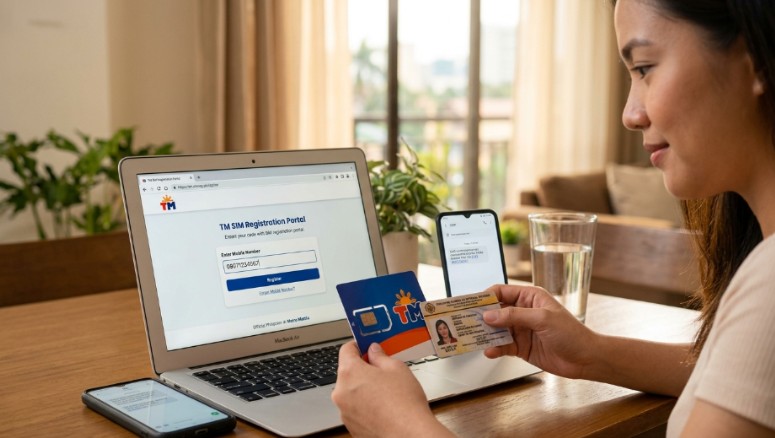
The cleanest way to register a TM SIM is through Globe’s official SIM registration portal or the GlobeOne app. Globe lists these as the official places for TM and Globe SIM registration.
Here is the simple flow:
- Open the official SIM registration page or the GlobeOne app.
- Verify your mobile number.
- Choose your SIM registration type.
- Upload your ID and selfie.
- Fill out the form and review your details.
- Submit and wait for the confirmation.
If you are using a new SIM, you can register right away and start using it after the process is complete. Globe also says SIM registration is free, so you do not need to pay any fee for the registration itself.
TM easy plan 150 After Registration
Once your SIM is registered, you can start using promos and services normally. Many users then look for budget-friendly tm easy plan 150 bundles and load offers that fit their daily needs. The important thing is to make sure your SIM is active first, because registration is the base step before you can enjoy full mobile use. Globe says new and existing customers can use the official registration flow, and registered SIMs are meant to stay connected for calls, texts, and internet services.
If you are checking promos after setup, use the official app or official channels only. That keeps your account safe and helps you avoid fake promo pages that copy telco names. Globe has warned users that fake registration and scam pages can look real, so it is best to stay inside the official system for any SIM-related task.
Why You Should Not Use Fake Registration Links
Fake links are a real problem. Globe has warned that fraudsters create pages that look like official SIM registration portals, but they are not safe. These pages may ask for private details and send users to harmful sites.
A real registration page should be simple and clear. It should ask for the basic information needed for verification and should not feel strange or suspicious. If a page asks for extra payment, strange downloads, or unrelated details, stop right away.
What Happens After You Register
After you finish registration, your TM SIM should be ready for normal use. You can then use it for calls, texts, mobile data, and other services tied to your account. Globe says registered SIMs can be used for mobile internet, calls, and texts, and the registration system is built to keep the service active and protected.
If you are porting, replacing, or switching a line, Globe also provides official support through its store locations and online channels. For users who need help in person, Globe says assistance is available at Globe stores and authorized locations.
How to Keep Your TM SIM Safe
A few small habits can save you a lot of trouble. Always use the official registration page or GlobeOne app. Never share your details on random websites. Do not let anyone promise a faster registration for a fee. Globe says registration is free, and it reminds users to register their own SIM for safety.
It is also smart to keep a copy of your ID details and confirmation message in a safe place. That makes it easier if you ever need to check your account again. Simple habits like this make mobile use smoother and safer.
Common Mistakes People Make
One common mistake is opening the wrong website. Another is using an old or expired ID. Some people also stop halfway through the form and forget to finish the last step. These small errors can delay the process. Globe’s official guide shows that the process should be completed in order, starting with mobile number verification and ending with review and submission.
Another mistake is trying to register through a site that is not official. Globe has been clear that fake pages exist and that users should stick to the official portal or app. That one choice can protect your personal information and your SIM.
Why TM SIM Registration Is Worth Doing Right
When your SIM is registered the right way, everything feels easier. Your number stays active. Your account is better protected. Your mobile use is less likely to be interrupted. Globe’s SIM registration pages and FAQs are built to guide customers through a safe process for TM, Globe, and other services under the same system.
It only takes a few minutes, but it gives you long-term peace of mind. That is why doing it carefully is better than rushing. The safest route is also the simplest route.
Final Tips for a Smooth Registration
Keep your ID ready before you begin. Use the official portal or GlobeOne app. Check your details before you submit. Do not trust random registration pages. And do not pay anyone to do the process for you, since Globe says registration is free and should be done through official channels.
If you get stuck, visit a Globe store or check the official help pages. Globe says support is available through its store network and official online channels. That makes it easier to get help without risking your personal information.
Final Thoughts
TM SIM registration is easy when you follow the correct steps. Use the official registration page or the GlobeOne app, prepare your basic ID details, and submit everything carefully. Globe’s current guidance shows that the process is simple, free, and built to help users stay safe online.
The best rule is also the easiest one: do it once, do it right, and use only official channels. That way, your TM SIM stays ready for calls, texts, and data without trouble.

John Bobo is an experienced professional with over 10 years of expertise in his field. He is passionate about sharing knowledge, inspiring others, and helping people achieve their goals. With a strong background built through years of dedication and hard work, John continues to create valuable content that informs and motivates his readers.