
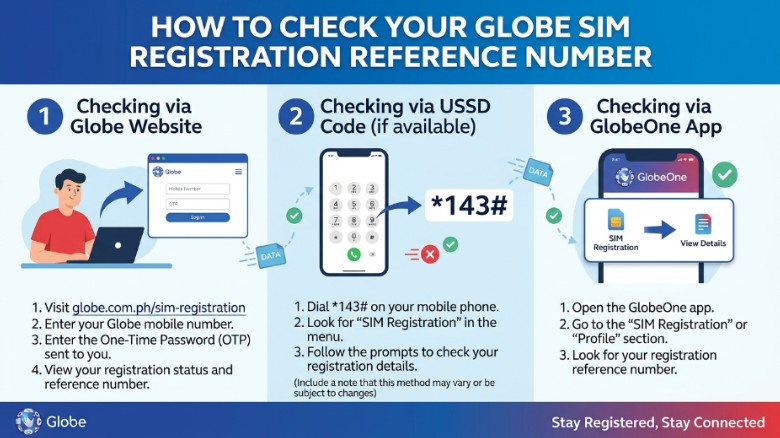

If you want to check your Globe SIM card registration reference number, start by going to new.globe.com.ph.simreg and follow the steps shown in Globe’s official SIM registration pages. Globe says the reference number appears on your screen after registration is complete, so it is best to save it right away for future use.
What the Globe SIM registration reference number is
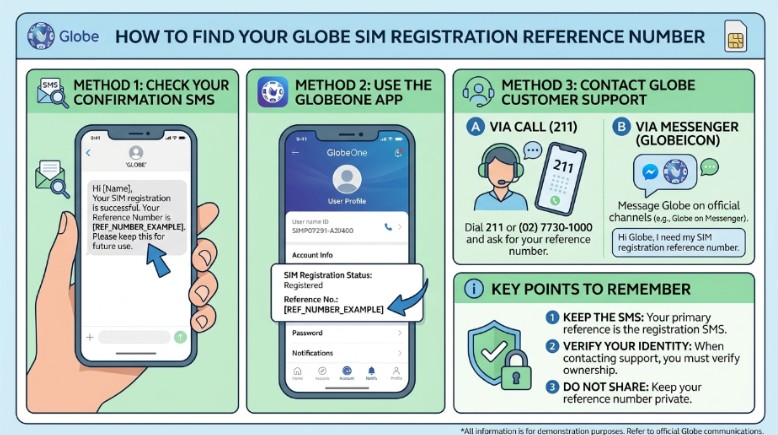
Your Globe SIM registration reference number is proof that your SIM was registered. Globe says to keep this number because it may help you with future concerns. Globe also says the reference number appears on-screen once the registration is done. That is why many users take a screenshot or write it down after they finish.
This number matters because it shows that your SIM is already in the system. If you ever need to ask for help, check your status, or confirm that registration went through, this number can make things easier. Globe’s help page also reminds users to keep the number safe after registration.
Why you should check it online
Checking your SIM registration details online saves time. Globe has an official SIM registration portal where you can enter your mobile number, receive a one-time PIN, and continue with the process. Globe also says users who are already registered can click to view or edit their details.
This is useful because people often change their phone numbers, home addresses, or legal names. Globe says customers should keep their SIM registration details updated when changes happen. Globe also says users may update their details up to two times a year.
How to check your Globe SIM registration reference number
The process is simple. First, open the official Globe SIM registration page. Globe’s registration portal asks you to verify your mobile number before moving to the next step. After that, you will receive a one-time PIN by SMS. Globe says the OTP expires in 5 minutes, so enter it quickly.
Next, continue through the form and review your details. Globe’s site shows the main steps as: verify your mobile number, choose your SIM registration type, provide your ID and selfie, fill up the registration form, and review your details. Once the registration is complete, the reference number appears on-screen.
If you are checking an already registered SIM, Globe’s SIM registration page says you can view or edit your details. That means you do not always need to start over. You can open the portal, enter your number, and confirm the information already linked to your SIM.
What to do after you find the reference number
When the reference number appears, save it at once. Globe says this number should be kept for future concerns. A simple screenshot is often enough, but you can also write it in a notebook or save it in a secure note on your phone.
Do not share that number with random people. It is part of your registration record, so treat it like an important receipt. Globe’s guidance shows that the number is proof of registration, and proof should be kept in a safe place.
If you cannot find the number
Sometimes users forget to save the reference number. If that happens, the first thing to do is check whether the registration was completed fully. Globe says the reference number appears on-screen when registration is done, so if you never saw it, the process may not have finished.
If your SIM was registered but still has issues, Globe says you can reach out through Globe Telecom Facebook Messenger or visit the nearest Globe store. For Business Prepaid users, Globe lists email and hotline support as well.
Text SIMREG to 8080 for postpaid lines
For Globe Postpaid and Platinum customers, Globe says the process can be done in a different way. Globe’s official guide says Globe will send an SMS to check if your SIM registration details are correct. To confirm, customers can text SIMREG to 8080. Globe then sends a follow-up text to complete the confirmation.
This is important because postpaid users often already have their data in Globe’s system. Globe says their information should already be there, and the customer only needs to confirm if the details are correct. If changes are needed, Globe says the user may need to visit a Globe store for help.
What details Globe may ask for
Globe’s SIM registration page asks for basic personal details. These include full name, birthday, sex, address, and nationality. Globe also asks for a valid government ID and a selfie.
Globe says accepted IDs include passport, national ID, driver’s license, senior citizen’s card, and more. Globe also advises using a PVC-type ID when possible because paper-type IDs or IDs with printed photos may not be accepted.
If you are a minor, Globe says the SIM must be registered under a parent or legal guardian. If you are a foreign national, Globe says you must also register your Philippine SIM. For tourists, Globe says the SIM is valid for 30 days and then deactivates automatically unless the rules are followed.
How to update your SIM details later
You may need to change your SIM details if your life changes. Globe says customers can update details like a new home address, a new last name after marriage or legal change, or an updated government ID. Globe also says you can update your SIM registration details up to two times a year.
Globe says the update process is done online through the SIM registration portal. The company says to log in, choose the registration section, click “Edit,” make the changes, and save the new information. This is helpful for people who moved, changed names, or renewed their ID.
Why your details must match
Your SIM details should match your real documents. Globe says it needs correct and complete information, plus a verifiable photo ID. That is why you should use your real name, your current address, and the right ID when checking or updating your SIM record.
If the details do not match, it may cause trouble later. Globe warns that false information or failure to update details may lead to penalties under the law. So it is always better to keep the record clean and correct from the start.
New SIM vs. old SIM
If your Globe SIM is new, registration must be done before activation. Globe’s prepaid SIM terms say new subscribers must register before their SIM becomes active. Globe also says that failure to comply with the SIM Registration Act can lead to automatic deactivation.
If your SIM is old, the main job is to check whether it was already registered and whether the record is correct. Globe’s SIM registration portal allows users to view or edit details if they are already registered. That is useful for older SIM users who want to confirm their status.
Watch out for fake links
Globe has also warned customers about fake SIM registration links. The company says users should use the official portal and the GlobeOne app only. Globe issued this warning because scammers may try to trick people with fake pages that look real.
This means you should be careful before clicking any link sent by message or social media. If the link does not match Globe’s official pages, do not trust it right away. Globe’s scam alert page says fake messages may claim your SIM is expiring or ask for personal information.
Simple steps to remember
Here is the easiest way to think about it. Go to the official Globe registration page. Enter your mobile number. Get the OTP. Fill out the form. Review your details. Then save the reference number when it appears. Globe’s own steps follow that same flow.
If your SIM is already registered, check whether your details are still correct. If something changed, update it. Globe says users can view or edit their details online, and it also says updates should be made when needed.
Best habits for keeping your SIM record safe
Keep a copy of your reference number in more than one place. Keep your ID valid. Keep your mobile number active so you can receive the OTP. Also keep your details up to date when you move or change your name. These small habits make your SIM record easier to manage.
Do not rush through the form. Read each step before you click submit. Globe says the process includes a review step, and it is smart to use that step to check your name, address, and ID details one more time.
What Globe says about help and support
If your SIM is registered but still not working, Globe says you should contact support through Facebook Messenger or visit the nearest Globe store. That is the official next step when the registration looks complete but the SIM still has issues.
For business users, Globe also lists email and hotline support. This is useful for companies or teams that manage many SIMs and need help with registration or account issues.
Why this matters for every Globe user
A SIM is more than just a number. It is linked to messages, calls, and online accounts. That is why Globe and the SIM Registration Act require the record to be correct and up to date. Globe says the system is meant to help stop spam, scams, and SIM-aided crime.
When you know how to check your SIM card registration reference number, you stay more in control. You know whether your record is complete. You know where to look if something changes. And you know how to keep your mobile line active and safe.
Final words
If you want to check your Globe SIM card registration reference number, use the official Globe SIM registration page, confirm your mobile number, and follow the steps until the number appears on-screen. Save it right away, because Globe says it should be kept for future concerns. If you are a postpaid user, Globe also says you may confirm details by texting SIMREG to 8080.

John Bobo is an experienced professional with over 10 years of expertise in his field. He is passionate about sharing knowledge, inspiring others, and helping people achieve their goals. With a strong background built through years of dedication and hard work, John continues to create valuable content that informs and motivates his readers.